v0.1.1 — MIT · 1054 / 1054 passing

Make XLSX LLM Ready

The missing ETL step between your spreadsheets and your LLM. Turn .xlsx into structured, typed, citation-ready JSON — cells, formulas, merges, tables, charts, dependency graphs, and token-counted chunks.

pip install ks-xlsx-parser · Python 3.10+ · runs on macOS, Linux, Windows
bash
$ pip install ks-xlsx-parser
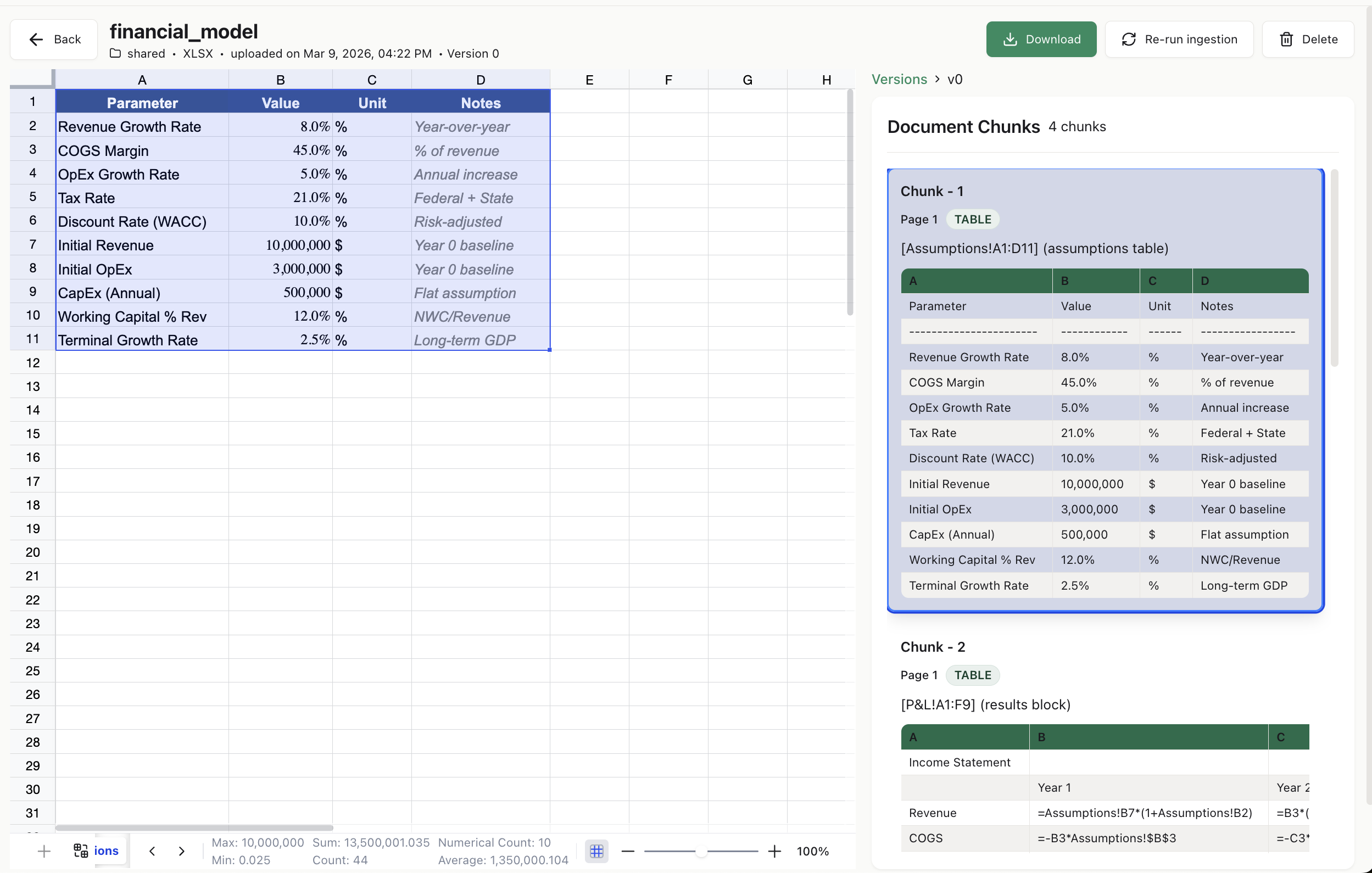
ks-xlsx-parser highlighting a financial model on the left and emitting typed, citation-linked chunks on the right
Raw workbook on the left (financial_model.xlsx) → parser output on the right: 4 chunks, each tied back to an exact sheet!range.
WHAT YOU GET

A graph your LLM can cite, not a CSV it has to guess at.

Most Excel libraries give you a dataframe. ks-xlsx-parser gives you a full workbook graph — every cell typed, every formula parsed, every chunk addressable back to exact source coordinates.

🧾

Typed cell graph

Values, formulas, styles, coordinates — all round-trip to JSON / DB / vector store.

🧭

Citation URIs

Every chunk carries a file.xlsx#Sheet!A1:F18. The LLM points back at the exact cell.

🧮

Dependency graph

Directed formula graph with upstream, downstream, and cycle detection.

🧩

RAG-ready chunks

HTML + pipe-text, token-counted via tiktoken, content-hashed for dedup.

📊

All 7 chart types

Bar · line · pie · scatter · area · radar · bubble, each with a text summary.

🎨

Conditional formatting

Every Excel rule type — color scales, data bars, icon sets, formulas.

📋

Tables & merges

Excel ListObjects and master/slave merge relationships preserved.

🔐

Safe by default

No macro execution, no external links, ZIP-bomb guard, size limits.

30-SECOND DEMO

Three lines to go from .xlsx to LLM-ready chunks.

Every ChunkDTO ships with a source URI, a token count, rendered HTML + text, a dependency summary, and a content hash. Wire it straight into a LangChain, LangGraph, CrewAI, or OpenAI-Agents tool.

python
from ks_xlsx_parser import parse_workbook

result = parse_workbook(path="q4_forecast.xlsx")

for chunk in result.chunks:
    print(chunk.source_uri)        # q4_forecast.xlsx#Revenue!A1:F18
    print(chunk.token_count)       # 412
    print(chunk.render_text[:200])  # pipe-delimited, LLM-friendly
    print(chunk.render_html[:200])  # HTML with proper colspan/rowspan

What you get back

  • source_uri — cite back to exact cells
  • render_text / render_html — LLM-consumable bodies
  • token_count — keep context-window math honest
  • dependency_summary — upstream / downstream formulas
  • content_hash — xxhash64 dedup across versions
  • block_type — HEADER · DATA · TABLE · CHART_ANCHOR · …

📖 Full Quick Start →

TESTED & FAST

1054-workbook stress corpus. Every commit.

testBench ships with the repo and runs in CI. One-feature-per-file matrix, randomised density cocktails, and engineered adversarial files — unicode bombs, circular refs, sparse 1M-row sheets, 250-sheet workbooks.

1054/1054tests passing on every CI run
~70send-to-end bench wall time
66×Walbridge financial model speedup (0.1.1)
17 MBdataset zip attached to each release
HOW IT COMPARES

Dataframes are for analysts. Graphs are for agents.

Capabilitypandas / openpyxlDoclingks-xlsx-parser
Reads values
Parses formulas with dependency graphraw string
Preserves merges (master/slave)coords onlypartial
Extracts charts (bar/line/pie/…)
Conditional formatting rules
Multi-table sheet layoutpartial
Citation URI per chunkpartial
Token count per chunk
Deterministic content hashes
USE CASES

How to parse Excel for your agent stack

Every framework gets the same output: chunks with a source_uri, token_count, rendered HTML + text, and a dependency summary. Wire it in once; cite cells forever.

🦜

Excel for LangChain

Wrap parse_workbook() as a @tool; return chunk.render_text with the source_uri in metadata so the agent cites exact cells.

🕸️

Excel for LangGraph

Use a ToolNode that calls parse_workbook() once per uploaded workbook and passes the chunks as state between graph nodes.

👥

Excel for CrewAI

Give each crew member a load_spreadsheet(path) tool. Analysts get the cells, writers get the rendered chunks with tokens capped.

🧠

Excel for the OpenAI Agents SDK

Register parse_workbook as a @function_tool; pass the resulting chunks as the answer to the load_spreadsheet action.

🧩

Excel for MCP clients (Claude Desktop, Cursor, Windsurf, Zed)

Run xlsx-parser-api and call POST /parse. Any MCP-aware client can now read Excel files with citations.

🧬

Excel for RAG pipelines (Qdrant, pgvector, Weaviate, Pinecone)

result.serializer.to_vector_store_entries() emits id + text + metadata triples ready to upsert. Each entry has a content hash for dedup.

FAQ

Frequently asked questions

Answers to the questions developers actually type into Google and ChatGPT.

What is the best Python library to parse Excel (.xlsx) files for LLMs?

ks-xlsx-parser is the purpose-built option. Unlike pandas or openpyxl, it preserves formulas with a directed dependency graph, merged regions, tables, charts, and conditional formatting — and emits token-counted chunks with source_uri citations an LLM can quote. pip install ks-xlsx-parser.

How do I parse Excel for a LangChain or LangGraph agent?

Call parse_workbook(path=...), then expose the resulting .chunks as a LangChain @tool or a LangGraph ToolNode. Each chunk carries source_uri, render_text, token_count, and dependency_summary — everything an agent needs to cite and reason.

How do I use Excel in a CrewAI or OpenAI-Agents-SDK agent?

Same pattern: wrap parse_workbook in whatever tool abstraction your framework provides (@tool in CrewAI, @function_tool in the OpenAI Agents SDK). The parser's output is framework-agnostic.

Can Claude Desktop, Cursor, or another MCP client read Excel files?

Yes. Run the bundled FastAPI server (pip install ks-xlsx-parser[api]; xlsx-parser-api) and call POST /parse. An MCP server that wraps the parser directly is on the roadmap.

How do I build a RAG pipeline over Excel spreadsheets?

Three steps: pip install ks-xlsx-parser; call parse_workbook() on each .xlsx; call result.serializer.to_vector_store_entries() and upsert into Qdrant, pgvector, Weaviate, or Pinecone. Every entry has a deterministic content_hash for dedup and a source_uri the LLM can cite.

How is ks-xlsx-parser different from openpyxl or pandas?

openpyxl and pandas give you a rectangle of values. ks-xlsx-parser gives you the full workbook graph: parsed formulas with dependency edges, merged regions, Excel ListObjects, all 7 chart types, every conditional-formatting rule type, and LLM chunks with citation URIs + token counts. It wraps openpyxl and uses lxml for the bits openpyxl loses.

Does ks-xlsx-parser run Excel formulas or macros?

No. The library reads .xlsx files; it never executes them. VBA macros are flagged but never run. External links are recorded but never resolved. ZIP-bomb and cell-count limits make it safe for untrusted uploads.

Is ks-xlsx-parser free and open source?

Yes — MIT licensed. Source: github.com/knowledgestack/ks-xlsx-parser. Part of the Knowledge Stack ecosystem, which also includes ks-cookbook (agent recipes).

What Excel features are supported?

Cells, formulas (with cross-sheet and table refs), merged regions, Excel ListObjects, all 7 chart types, conditional formatting (every rule type), data validation, named ranges, hyperlinks, comments, rich text, hidden rows/columns/sheets, freeze panes, and edge addresses up to XFD1048576. Not supported: .xls legacy, pivot-table data, sparklines, VBA execution.

How fast is it?

The full 1054-workbook testBench round-trips in about 70 seconds. A real 21k-cell, 13-sheet financial model parses in ~4.6 s. Sparse workbooks with extreme addresses parse in under 200 ms. Details in the CHANGELOG.
KNOWLEDGE STACK

Part of a larger open-source family.

ks-xlsx-parser is one piece of the Knowledge Stack ecosystem — document intelligence for agents. Focus on agents; we handle the messy parts of enterprise data.

📚

ks-cookbook

32 production-style flagship agents + recipes for LangChain, LangGraph, CrewAI, Temporal, and the OpenAI Agents SDK.

📊

ks-xlsx-parser

This repo. Turn .xlsx into LLM-ready JSON with citations and dependency graphs.

🧰

knowledgestack

Follow the org for upcoming parsers and MCP servers — PDF, DOCX, PPTX, HTML, and more.

Ship the spreadsheet feature you've been avoiding.

Star the repo, join the Discord, and tell us what your weirdest .xlsx looks like.

RELATED

Also known as

ks-xlsx-parser is the open-source answer to a lot of queries developers are typing today: Python Excel parser for LLMs, XLSX to JSON for LangChain, Excel ingestion for LangGraph, spreadsheet reader for CrewAI, Excel tool for OpenAI Agents SDK, Excel for Claude Desktop, Excel for Cursor, Excel MCP server, openpyxl alternative for RAG, Excel dependency graph extractor, XLSX OOXML parser for AI, how to parse Excel for an LLM agent, how to feed a spreadsheet to ChatGPT, how to cite Excel cells in an LLM answer, best library to turn Excel into JSON, Python library for parsing formulas, Excel formula dependency traversal, document intelligence for spreadsheets, RAG over Excel files, Excel chunker with token counts, Excel parser with citations, how to build an agent that reads Excel, Excel to vector database pipeline, parse .xlsx for Qdrant, parse .xlsx for pgvector, parse .xlsx for Weaviate, parse .xlsx for Pinecone.

If any of that describes what you're trying to do: star the repo, join the Discord, or drop an issue so we know what to build next.